State Persistence Techniques for the Flutter Bottom Navigation Bar
Prevent rebuilding the bottom navigation bar screens in Flutter

Overview
Building a bottom navigation bar is simple in Flutter given the BottomNavigationBar Widget. However, we want to add features to the standard Widget.
We'll set up a basic flutter app with bottom navigation and look at the problems we face. Like not initializing the bottom navigation bar pages every time we switch tabs or preserving the state of bottom tab pages.
Then we'll try a couple of approaches for resolving them. We'll compare the results and we can decide which one to go forward with.
Here's the GitHub repo with all the code.
Setup
We're going to start with the basic app containing bottom navigation with two tabs.
- Tab 1: Scrollable list of items.
- Tab 2: Displaying the escaped seconds of a Timer.
What do we want to achieve?
- Create the navigation bar page only when we open the page.
- Preserve scroll position of navigation bar page in Tab 1.
- Preserve the escaped time of Timer in Tab 2.
Implementation
Let's start with a new Flutter project.
Parent Widget: Bottom navigation bar
We have a simple Scaffold with BottomNavigationBar containing two Tabs.
class BasicBottomNavigation extends StatefulWidget {
  const BasicBottomNavigation({Key? key}) : super(key: key);

  @override
  State<BasicBottomNavigation> createState() => _BasicBottomNavigationState();
}

class _BasicBottomNavigationState extends State<BasicBottomNavigation> {
  int currentIndex = 0;

  @override
  Widget build(BuildContext context) {
    return Scaffold(
      body: [         /// List of tab page widgets
        const _Tabbar1(),
        const _Tabbar2(),
      ][currentIndex],
      bottomNavigationBar: BottomNavigationBar(
        currentIndex: currentIndex,
        onTap: (index) {
          setState(() {
            currentIndex = index;     /// Switching tabs
          });
        },
        items: const [
          BottomNavigationBarItem(icon: Text("1"), label: "Tab"),
          BottomNavigationBarItem(icon: Text("2"), label: "Tab"),
        ],
      ),
    );
  }
}
Tab 1: A scrollable list of items
We have a ListView displaying the index inside a ListTile.
class _Tabbar1 extends StatelessWidget {
 const _Tabbar1({Key? key}) : super(key: key);

 @override
 Widget build(BuildContext context) {
   print("Tabbar 1 build");

   return Scaffold(
     appBar: AppBar(title: const Text("Tab bar 1")),
     body: ListView.builder(
       itemBuilder: (context, index) {
         return ListTile(
           title: Text("${index + 1}"),
         );
       },
       itemCount: 50,
     ),
   );
 }
}
Tab 2: Displaying escaped seconds of a Timer
We are using a Ticker to run the Timer and update our escaped duration every second.
Fun Fact: Ticker is used in Flutter for callbacks during Animation frames.
class _Tabbar2 extends StatefulWidget {
  const _Tabbar2({Key? key}) : super(key: key);

  @override
  State<_Tabbar2> createState() => _Tabbar2State();
}

class _Tabbar2State extends State<_Tabbar2>
    with SingleTickerProviderStateMixin {
  late final Ticker _ticker;
  Duration _escapedDuration = Duration.zero;

  get escapedSeconds => _escapedDuration.inSeconds.toString();

  @override
  void initState() {
    super.initState();
    print("Tabbar 2 initState");

    _ticker = createTicker((elapsed) {
      if (elapsed.inSeconds - _escapedDuration.inSeconds == 1) {
        setState(() {
          _escapedDuration = elapsed;
        });
      }
    });

    _ticker.start();
  }

  @override
  void dispose() {
    _ticker.dispose();
    super.dispose();
  }

  @override
  Widget build(BuildContext context) {
    return Scaffold(
      appBar: AppBar(title: const Text("Tab bar 2")),
      body: Center(
        child: Text(escapedSeconds),
      ),
    );
  }
}
Demo
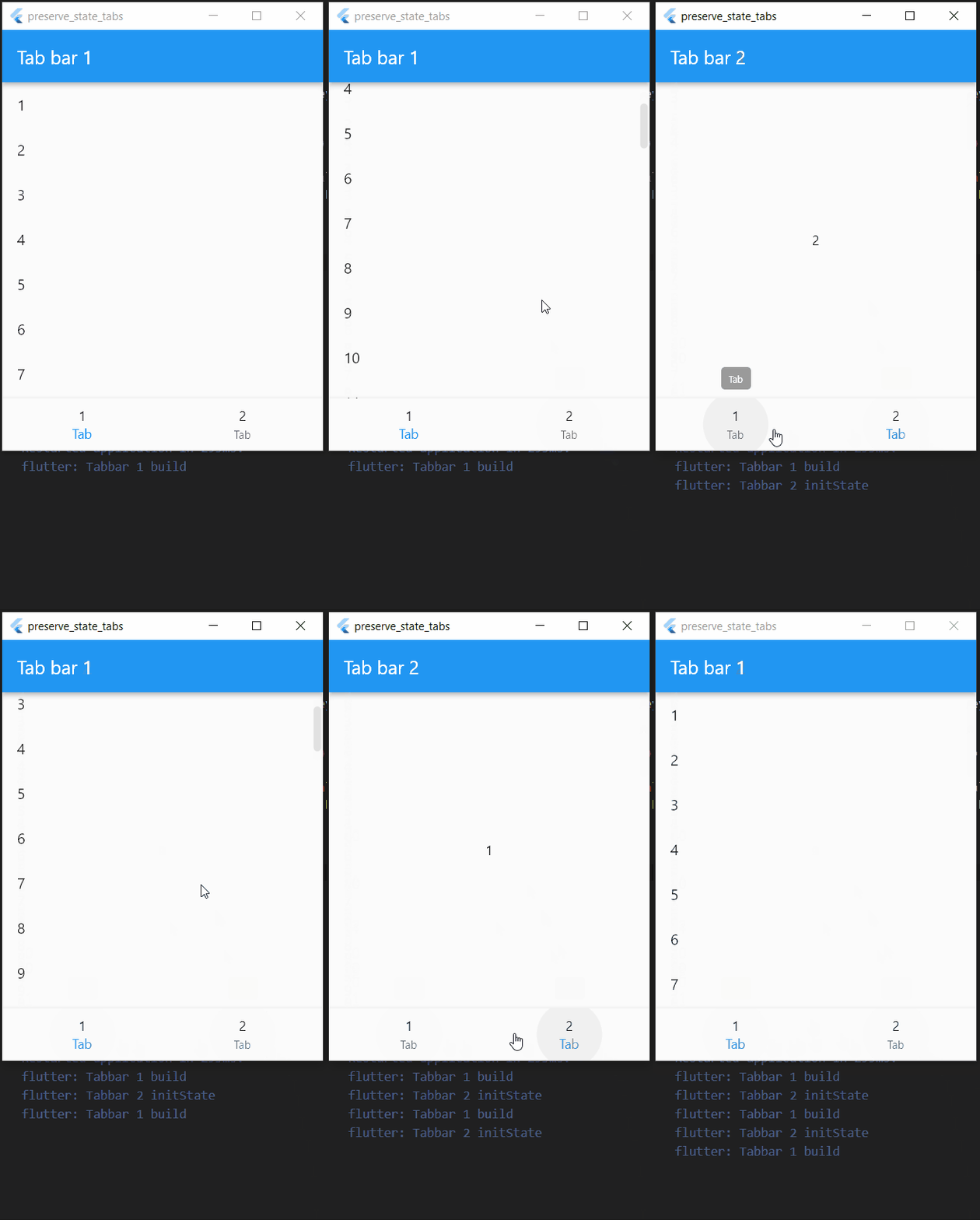
Result
- Tabs are initialized only when we click on them.
- The scroll position is not preserved.
- Escaped time of the Timer is not preserved.
Nothing was preserved. We create new tab pages every time we click on them. The scroll position is lost we switch back to Tab 1. The Timer starts from 0 whenever we open Tab 2.
There is no problem with this approach as long as we don't need to preserve any state.
But since we do, let's look at how we can achieve it.
1. Stack and OffStage
One way to persist the bottom navigation bar page is to use Stack Widget.
We'll add all the pages as children of Stack with the order of the bottom tabs and display one child at a time with respect to the currently selected bottom tab.
Implementation
We'll wrap the Tabbar widgets with OffStage and the children list with Stack.
The offstage parameter takes a boolean value. If it's true, then the child is hidden or offstage, otherwise, the child is visible.
There is no change in the Tabbar classes.
Parent Widget: Bottom navigation bar
 return Scaffold(
      body: Stack(       ///  Added Stack Widget
        children: [
          Offstage(          /// Wrap Tab with OffStage
            offstage: currentIndex != 0,
            child: const _Tabbar1(),
          ),
          Offstage(
            offstage: currentIndex != 1,
            child: const _Tabbar2(),
          ),
        ],
      ),
Demo
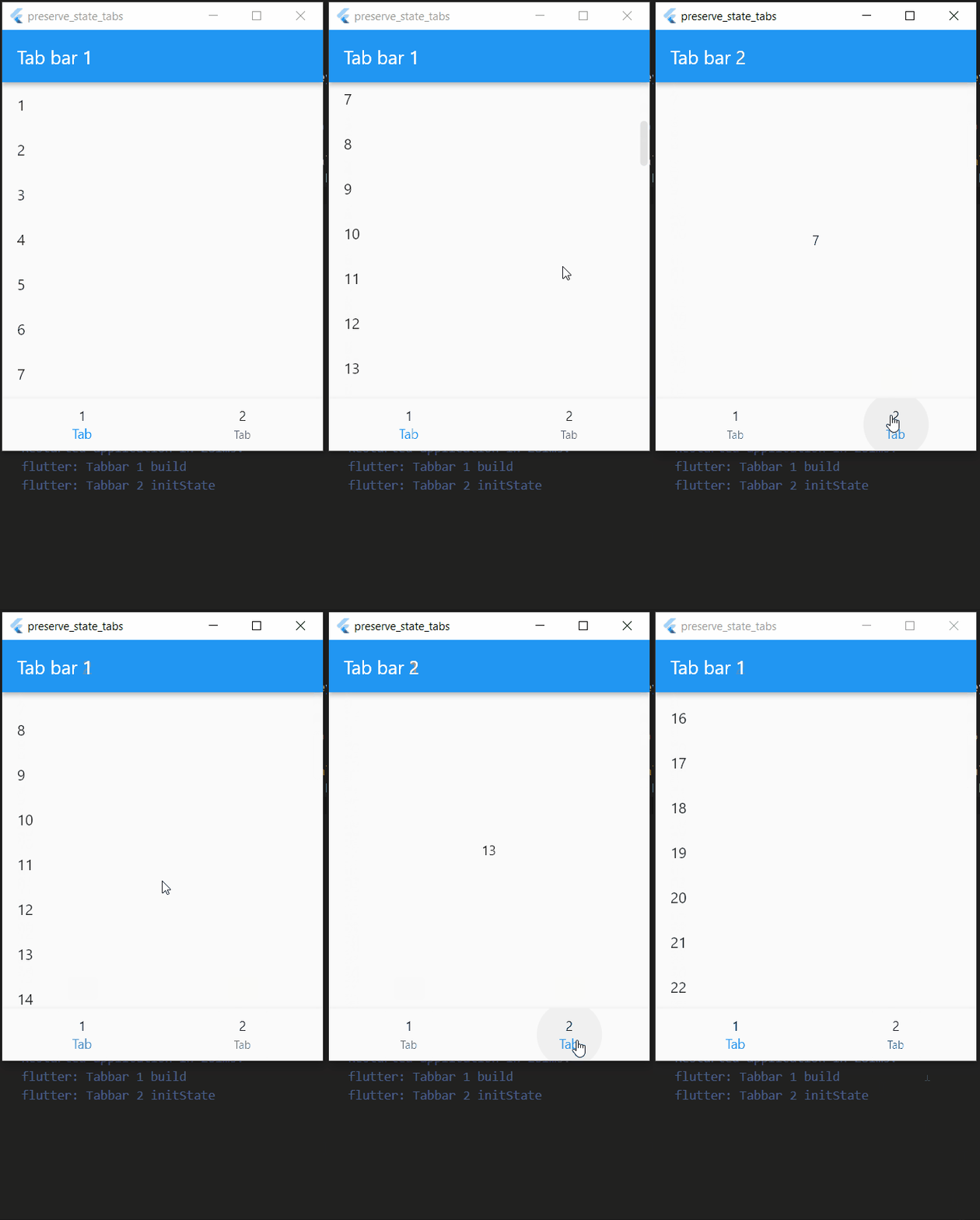
Result
- Tabs are not initialized only when we click on them.
- The scroll position is preserved.
- Escaped time of the Timer is preserved.
All the tabs are initialized with the parent Widget. Hence the timer in Tabbar 2 started before we even opened that Tab. The good thing is that it preserves the scroll position and escaped time.
If creating all the tabs at once does not affect the performance and is what we want, then we use this technique.
1. Alternative - Indexed Stack
Turns out there's a Widget (as always with Flutter 😇) called IndexedStack that we can use. It's less code with the same result.
Parent Widget: Bottom navigation bar
return Scaffold(
      body: IndexedStack(      /// Replaced with IndexedStack
        index: currentIndex,
        children: const [
          _Tabbar1(),
          _Tabbar2(),
        ],
      ),
2. AutomaticKeepAliveClientMixin
As the name suggests, this mixin makes the client (Tabbar child widgets) keep themselves alive (not disposed of) after we switch the tabs. It also creates the Tab only when it is first clicked and not with the Parent Widget like the above methods.
Implementation
AutomaticKeepAliveClientMixin needs a PageView in the parent widget. So we'll wrap the body with PageView and pass the list of tabs as its children.
Further Reading: Other than PageView, there's a TabBarView (for top app bar tabs), which also makes AutomaticKeepAliveClientMixin work for tabs (child widgets) because it uses PageView internally.
Parent Widget: Bottom navigation bar
class AliveMixinDemo extends StatefulWidget {
  const AliveMixinDemo({Key? key}) : super(key: key);

  @override
  State<AliveMixinDemo> createState() => _AliveMixinDemoState();
}

class _AliveMixinDemoState extends State<AliveMixinDemo> {
  final PageController controller = PageController();  /// initializing controller for PageView

  int currentIndex = 0;
  final tabPages = [
    const _Tabbar1(),
    const _Tabbar2(),
  ];

  @override
  Widget build(BuildContext context) {
    return Scaffold(
      body: PageView(        /// Wrapping the tabs with PageView
        controller: controller,
        children: tabPages,
        onPageChanged: (index) {
          setState(() {
            currentIndex = index;     /// Switching bottom tabs
          });
        },
      ),
      bottomNavigationBar: BottomNavigationBar(
        currentIndex: currentIndex,
        onTap: (index) {
          controller.jumpToPage(index);    /// Switching the PageView tabs
          setState(() {
            currentIndex = index;
          });
        },
        items: const [
          BottomNavigationBarItem(icon: Text("1"), label: "Tab"),
          BottomNavigationBarItem(icon: Text("2"), label: "Tab"),
        ],
      ),
    );
  }
}
Tab 1: A scrollable list of items
We replacing to StatefulWidget here because AutomaticKeepAliveClientMixin only works with the State Class as defined in its implementation.
"A mixin with convenience methods for clients of AutomaticKeepAlive. Used with State subclasses."
We need only two additions after this.
First, call the super.build() inside the build method. Second, override the wantKeepAlive and return true.
class _Tabbar1 extends StatefulWidget {
  const _Tabbar1({Key? key}) : super(key: key);

  @override
  State<_Tabbar1> createState() => _Tabbar1State();
}

class _Tabbar1State extends State<_Tabbar1>
    with AutomaticKeepAliveClientMixin {     /// Using the mixin
  @override
  Widget build(BuildContext context) {
    super.build(context);    /// Calling build method of mixin
    print("Tabbar 1 build");
    return Scaffold(
      appBar: AppBar(title: const Text("Tab bar 1")),
      body: ListView.builder(
        itemBuilder: (context, index) {
          return ListTile(
            title: Text("${index + 1}"),
          );
        },
        itemCount: 50,
      ),
    );
  }

  @override
  bool get wantKeepAlive => true;    /// Overriding the value to preserve the state
}
Tab 2: Displaying escaped seconds of a Timer
The changes are the same as with the Tabbar 1 class above.
class _Tabbar2State extends State<_Tabbar2>
    with SingleTickerProviderStateMixin,
    AutomaticKeepAliveClientMixin {    /// Using the mixin
  late final Ticker _ticker;
  @override
  Widget build(BuildContext context) {
    super.build(context);     /// Calling build method of mixin
    return Scaffold(
      appBar: AppBar(title: const Text("Tab bar 2")),
      body: Center(
        child: Text(escapedSeconds),
      ),
    );
  }

  @override
  bool get wantKeepAlive => true;   /// Overriding the value to preserve the state
}
Demo
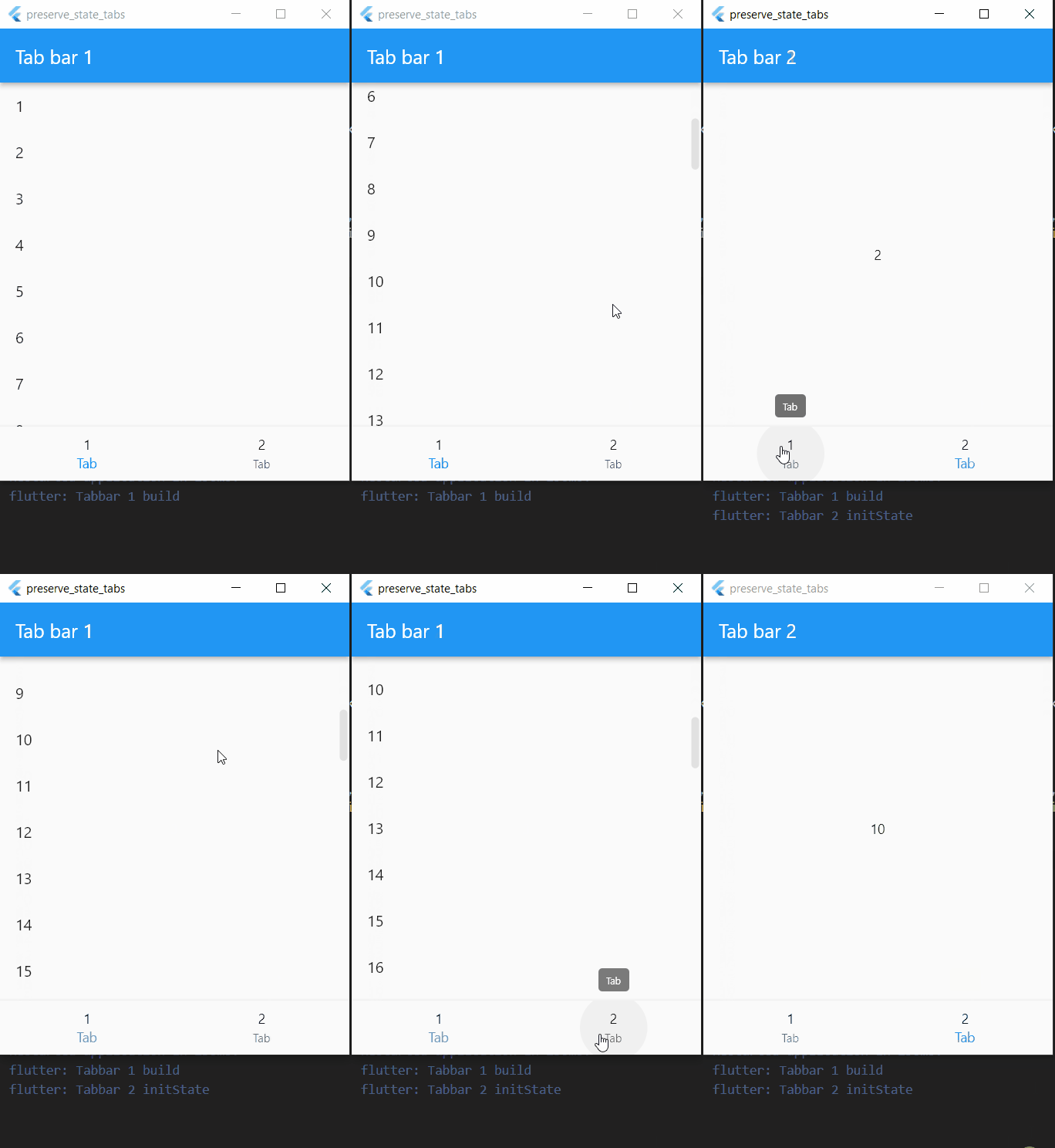
Result
- Tabs are initialized only when we click on them.
- The scroll position is preserved.
- Escaped time of the Timer is preserved.
The Tabbar 2 is initialized only the first time when we click on it. The Timer preserves its state and so does the scrolling position in Tabbar 1.
If we want to programmatically change the
keepAlivecondition, then we can use theupdateKeepAlive()method ofAutomaticKeepAliveClientMixin. For further reading, refer to this StackOverflow answer.
Conclusion
We can choose any one approach from the above options according to our requirements.
- Don't want to preserve any state -> standard
BottomBarNavigation. - Want to preserve state but fine with creating all the tabs at once ->
IndexedStackorStack and OffStage. - Want to preserve state and build tabs only once when clicked on them ->
AutomaticKeepAliveClientMixin.
IndexedStackis the simplest approach whileAutomaticKeepAliveClientMixincovers our need. Since we usually have API calls in tabs and don't want to call them every time we switch to that tab.
Final Note
Thank you for reading this article. If you enjoyed it, consider sharing it with other people.
If you find any mistakes, please let me know.
Feel free to share your opinions below.
About the author
I build apps, internal tools, and sketch stuff on my iPad. Into side projects, and occasionally sharing thoughts here.
Comments
Join the discussionthere is still have a problem.
if a page have FutureBuilder in a inner TabBarView, it will reload while change bottomNavigationBar even thouth did AutomaticKeepAliveClientMixin.
I fix this, also set FutureBuilder's parent widget is PageView.
stackoverflow futurebuilder-reloading-whenever-the-bottomnavigationbaritem-is-changed
Hey Michael, Glad you found the solution for this. There's another one that might help. Here's the link.
sorry about that, my way found not work today!
the youtobe video the future property is no argument, but I need multi FutureBuilder with List.generate, I can't use it.
Expanded(
                    child: Container(
                        color: const Color(0xFFF0F0F0),
                        child: _homePageController == null
                            ? Container()
                            : PageView(
                                onPageChanged: (pageIndex) {
                                },
                                physics: const ClampingScrollPhysics(),
                                controller: _homePageController,
                                children: List.generate(_homeRecommendDefaultCategoryList.length, (index) {
                                  return FutureBuilder<dynamic>(
                                      future: _homeRequestGoodsByRecommendCategory(index),
                                      builder: (BuildContext context, AsyncSnapshot<dynamic> snapshot) {
I find a newer way to final fix this! change FutureBuilder code into a child StatefulWidget with AutomaticKeepAliveClientMixin, and wrap _homeRequestGoodsByRecommendCategory(index) to a fix property _requestFuture with a fix index.
that is PageView nested PageView all themself's children need AutomaticKeepAliveClientMixin. and FutureBuilder's future need a origin property.
children: List.generate(_homeRecommendDefaultCategoryList.length, (index) {
                                  return HomeItemPage(
                                      index: index,
                                      homeRecommendDefaultCategoryList: _homeRecommendDefaultCategoryList,
                                      homeTabBarThresholdNotifier: _homeTabBarThresholdNotifier);
                                }))))
and the HomeItemPage should be
class HomeItemPage extends StatefulWidget {
  final int index;
  final dynamic homeRecommendDefaultCategoryList;
  final ValueNotifier<double> homeTabBarThresholdNotifier;

  const HomeItemPage({Key? key, required this.index, required this.homeRecommendDefaultCategoryList, required this.homeTabBarThresholdNotifier})
      : super(key: key);

  @override
  HomeItemPageState createState() => HomeItemPageState();
}

class HomeItemPageState extends State<HomeItemPage> with AutomaticKeepAliveClientMixin {
  late Future _requestFuture;

  @override
  void initState() {
    super.initState();
    _requestFuture = _homeRequestGoodsByRecommendCategory();
    print("--> homeItem initState");
  }

  @override
  void dispose() {
    print("--> homeItem dispose");
    super.dispose();
  }

  @override
  Widget build(BuildContext context) {
    super.build(context);
    print("--> homeItem build");
    return FutureBuilder<dynamic>(
        future: _requestFuture,
Mobile Engineering
Experiences, lessons, and technical deep dives from building mobile applications. Topics span Flutter, Dart, mobile architecture, application state, performance, and production software development.